Ducky
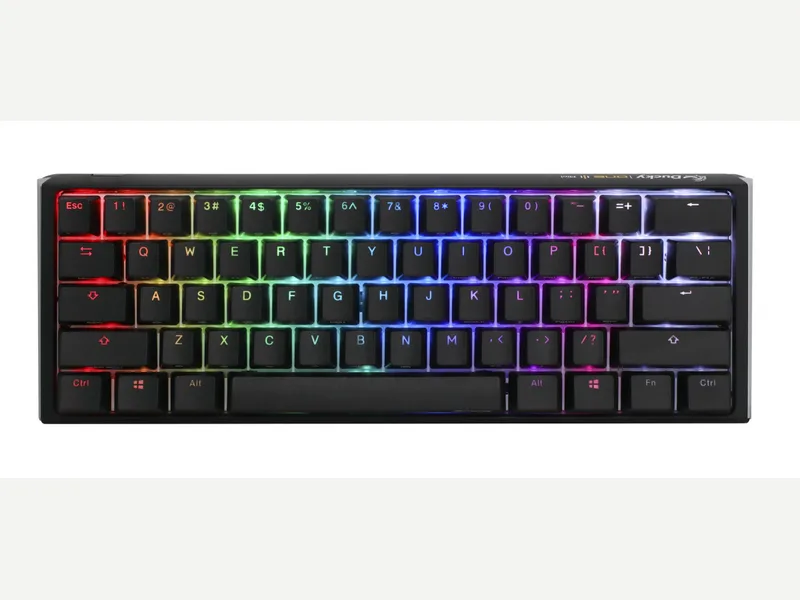
Ducky One 3 Mini
Released 2021
Researched from maker specs and published sources. Last checked Oct 18, 2026.
Ducky's wired hot-swap 60% with PBT keycaps and extra dampening
A wired 60% with a hot-swappable PCB, Cherry MX switches, double-shot PBT keycaps and foam dampening in a plastic case. ProSettings praised the feel and stabilizers; the trade-offs are no software, slight case flex and firmware key-registration issues on some versions.
Sources
Our take, based on research
A well-regarded compact Ducky for typing feel and sound. ProSettings recommends it for the stabilizers, foam and keycaps; the gaps are software, a plastic case and the reported firmware issues.
Overview
Ducky's One 3 page lists the 60% model at 310 x 110 x 40 mm and 650 g, wired with a detachable USB-C cable. It uses Cherry MX switches on Kailh hot-swap sockets, double-shot PBT keycaps and N-key rollover. Ducky's QUACK Mechanics approach adds in-house stabilizers, a rubber Q-Bounce pad fitted within the PCB and an EVA foam pad under the PCB. The page covers the whole One 3 series, so the sizes share one spec list.
ProSettings reviewed the One 3 Mini and called it a fantastic keyboard, praising the lubed stabilizers, foam dampening, hot-swap PCB and PBT keycaps, and said that with minimal tinkering it can feel and sound like a costlier board. It noted the plastic case (spray-painted with a metallic finish) flexes a little when squeezed by hand but not in normal use, that the bottom foam layer could be thicker, and that there is no software for lighting or macros. It also listed key-registering and latency issues on certain firmware versions as a downside. Tom's Guide and IGN Middle East reviewed the larger One 3 TKL rather than the Mini: Tom's Guide found its typing feel outstanding but missed wireless and companion software, and IGN found the stabilizers needed tuning.
The 60% layout puts arrows and the function row on layers, so it suits desks that prioritise mouse space over dedicated keys.
Pros & Cons
- Hot-swappable PCB with Kailh sockets, so Cherry MX switches can be changed without soldering (Ducky, ProSettings)
- Double-shot PBT keycaps with a frosted surface; ProSettings found them crisp and durable
- Lubed stabilizers and foam dampening that ProSettings said work well out of the box
- Compact 310 x 110 mm footprint at 650 g (Ducky)
- Detachable braided USB-C cable and extra PBT keycaps in the box (ProSettings)
- Wired only
- No companion software for lighting or macros (ProSettings)
- ProSettings noted a plastic case that flexes slightly when squeezed
- ProSettings reported key-registration and latency issues on certain firmware versions
- 60% layout puts arrows and the function row on layers
Who Is This For?
- Players who want a compact board that leaves room for mouse swings
- Buyers who want hot-swap Cherry MX and PBT keycaps without building a kit
- People happy to configure lighting and macros from the keyboard itself
- Wireless users
- Anyone who wants QMK or app-based remapping
- Spreadsheet and editing work that needs dedicated arrows
Where to Buy
Dimensions
310 x 110 x 40mm
Weight
650 g
Case Material
ABS plastic
Connectivity
Wired
Plate Options
Case Colors
Software Support
Similar Keyboards
View all
Looking for something different?
Browse All Keyboards