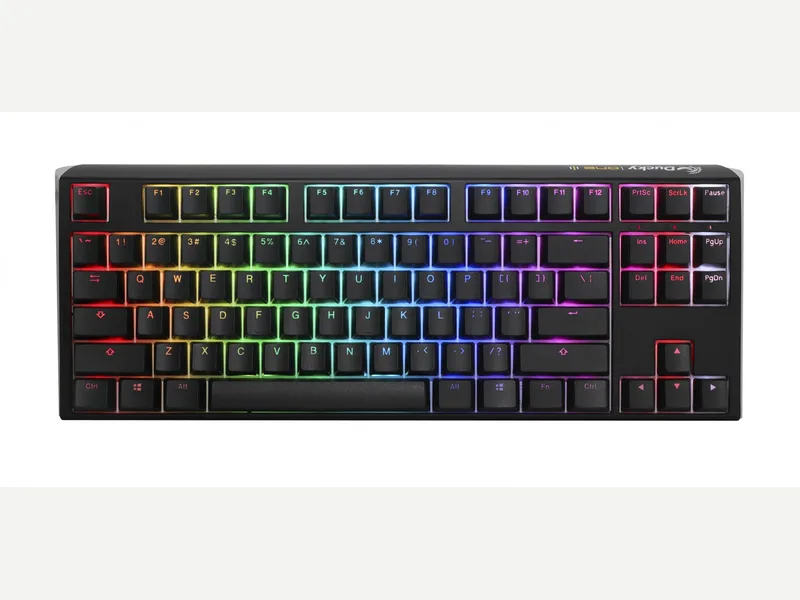
Ducky
Ducky One 3 TKL
Released 2021
Researched from maker specs and published sources. Last checked Oct 18, 2026.
Ducky's wired hot-swap TKL with PBT keycaps and Cherry MX
A wired 80% (TKL) board with a hot-swappable PCB, Cherry MX switches and double-shot PBT keycaps. Tom's Guide found the typing feel outstanding, and faulted the lack of wireless, companion software and macOS support.
Sources
Our take, based on research
A solid-feeling wired TKL that reviewers like for typing, held back by missing wireless and software. Tom's Guide questioned its cost; choose it for the Cherry feel and keycaps, not for features.
Overview
Ducky's One 3 page lists the TKL (80%) at 370 x 140 x 40 mm and 950 g, wired with a detachable USB-C cable, Cherry MX switches on Kailh hot-swap sockets, double-shot PBT keycaps and N-key rollover. Ducky's QUACK Mechanics brand covers the weight distribution, a rubber Q-Bounce pad within the PCB, EVA foam under it and tuned stabilizers. Tom's Guide quoted 32.02 ounces and Neowin's spec table lists 908 g for its review unit, both lower than Ducky's figure.
Tom's Guide called it a decent mechanical keyboard with an exceptional typing experience, great build quality and lovely typing sound, and said its Cherry MX Blue switches gave good tactile feedback. Its complaints were no Bluetooth or dongle, no companion software (lighting and macros are set by key combinations, which it found tedious), and limited macOS support, and it questioned whether the keyboard justified its cost. IGN Middle East reviewed the Matcha Green TKL after more than a month: it found the build premium and the keycaps wonderful, but the stabilizers needed serious fine-tuning, and it recommended Keychron, Akko or Epomaker boards for QMK/VIA software and wider keycap choice. Neowin rated the translucent-keycap TKL Aura 8 (Very good), liked that no software is needed because settings are changed with DIP switches and key combinations, and found the legends hard to read in low light with RGB on; it also noted only one cable length and no multi-device connectivity.
Pros & Cons
- Hot-swappable PCB, so switches can be changed without soldering (Tom's Guide)
- Double-shot PBT keycaps and Cherry MX switches (Ducky)
- Tom's Guide called the typing experience outstanding and the typing sound lovely
- Tom's Guide found the build quality great, with a weight that stays put on the desk
- Three foot angles and a detachable USB-C cable (Tom's Guide, Ducky)
- Wired only, with no Bluetooth or dongle (Tom's Guide)
- No companion software; macros and lighting are set by key combinations (Tom's Guide, IGN Middle East)
- Tom's Guide noted limited macOS support and a firmware update that is available only for Windows
- IGN Middle East found the stabilizers needed fine-tuning for the sound to match the board's build
- Plain wired feature set compared with Keychron or Akko boards that add QMK/VIA (IGN Middle East)
Who Is This For?
- Typists who want Cherry MX and PBT keycaps on a TKL from the factory
- Buyers who want hot-swap in a no-fuss wired board
- Anyone who likes bold colorways without relying on software
- Wireless users
- People who want app-based remapping or QMK
- Mac users who need full function-key support (Tom's Guide)
Where to Buy
Dimensions
370 x 140 x 40mm
Weight
About 950 g (Ducky); Tom's Guide and Neowin list about 908 g
Case Material
ABS plastic
Connectivity
Wired
Plate Options
Case Colors
Software Support
Similar Keyboards
View all
Looking for something different?
Browse All Keyboards