ZSA
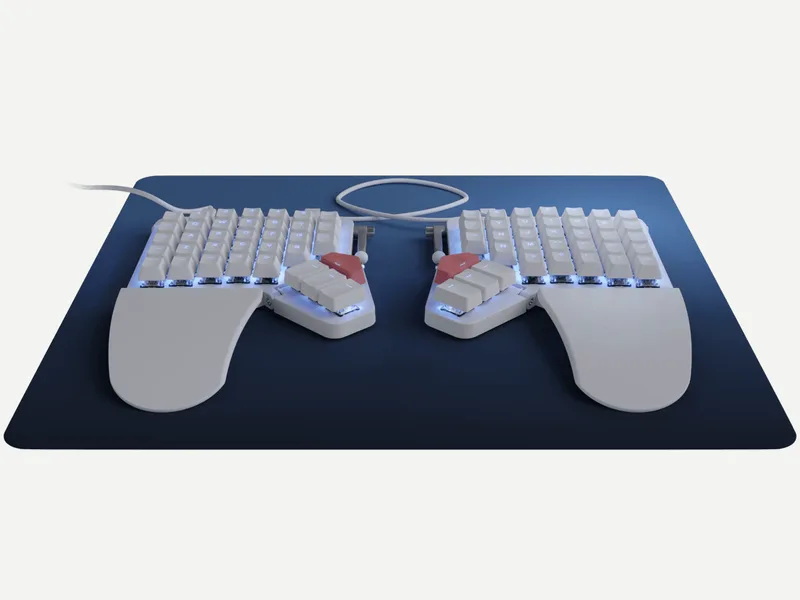
ZSA Moonlander
Released 2020
Researched from maker specs and published sources. Last checked Nov 15, 2026.
ZSA's modular, hot-swap split with a tilting thumb cluster and tenting accessory
A wired, hot-swap MX-style split with RGB, QMK firmware, a tilting thumb cluster and wrist rests. Tom's Guide praises the customization and typing feel and says it has a steep learning curve; PC Gamer notes no wireless option.
Sources
Our take, based on research
A well-regarded, modular wired split. Reviewers like the customization and typing feel, and mainly fault the adjustment period, the price and the lack of wireless.
Overview
The Moonlander (sold as Moonlander Mark I) is ZSA's larger, modular split. ZSA lists hot-swappable MX-style sockets, switch choices from Cherry MX and Kailh, doubleshot PBT keycaps (printed or blank), RGB lighting, open-source QMK firmware set up with Oryx, and a thumb module that tilts up and down with an attached wrist support that follows it. The halves link by TRRS cable and the board connects over USB-C. ZSA gives a two-year warranty and ships it with a carrying case.
Tom's Guide called it the most customizable and adaptable ergonomic split keyboard its reviewer had used, praising the hot-swappable keys and the Keymapp training app, and said the unique layout has a steep learning curve and the lightweight halves can shift under the hands; it also noted a $112 Platform accessory that supports the tented position. The Verge, reviewing it in 2021, said it took weeks of adjusting to feel right. PC Gamer lists no wireless option and a very high price among its cons.
ZSA's page lists prices from USD 365 with shipping included; the shop's Silent Red variant is USD 380.
Pros & Cons
- Highly customizable with a training app (Tom's Guide)
- Hot-swappable switches that feel good to type on (Tom's Guide)
- Tilting thumb cluster with a wrist support that follows it (ZSA)
- Carrying case and two-year warranty (ZSA)
- Wide choice of MX-style switches (ZSA)
- Steep learning curve (Tom's Guide, The Verge)
- Halves can feel light and shift on the desk (Tom's Guide)
- No wireless option (PC Gamer)
- Very expensive (PC Gamer, The Verge)
- Blank keycaps are confusing at first (PC Gamer)
Who Is This For?
- People who want a heavily customizable, hot-swap split
- Heavy typists who want tenting and a thumb cluster
- Users who like a training app for a new layout
- Buyers who want wireless
- People who need a short learning curve
- Anyone on a tight budget
Where to Buy
Dimensions
17 cm wide x 25 cm deep x 3 cm high per half (depth includes the wing; 17 cm without it)
Weight
About 675 g without wrist rests (about 800 g with them; the carrying case adds about 140 g)
Case Material
Not listed
Connectivity
Wired
Plate Options
Case Colors
Software Support
Similar Keyboards
View all
Looking for something different?
Browse All Keyboards