Keychron
Keychron Q11
Released 2023
Researched from maker specs and published sources. Last checked Oct 18, 2026.
Split 75% aluminum Q with a knob on each half
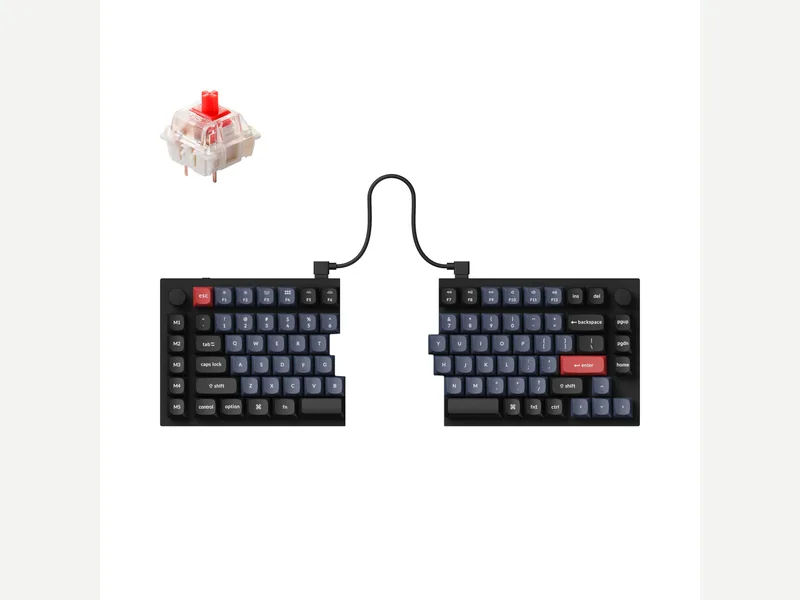
A fully split wired 75% aluminum Q with two knobs, five macro keys and a tray-mount case, about 1.2 kg. Reviewers like the build and customization; no tenting kit.
Sources
Our take, based on research
A well-regarded premium split keyboard. Reviewers liked the build and customization and mainly faulted the missing tenting kit, short cable and layout quirks.
Overview
The Q11 is Keychron's fully split Q. Its two halves are linked by a USB-C cable and can be placed apart and angled, in an all-metal tray-mount case with hot-swap sockets, a 75% layout with function and arrow keys, a column of five macro keys and a knob in each top corner. Keychron lists Keychron Super or Gateron G Pro switches on the assembled version, normal-profile double-shot PBT keycaps, QMK/VIA with the Launcher and 1,186 g. It is wired only, and Keychron's site also shows the Q11 Ultra 8K as the newer version.
Tom's Guide called it a great keyboard for improving posture, with premium construction, a comfortable typing experience and dedicated macro keys, but noted a steep learning curve, no tenting kit or wrist rest, a short cable and a high price; it weighed 2.61 lb. PCWorld said cheaper ergonomic keyboards exist but not with this level of customization and materials, liked the sturdy build and VIA support, and listed a slightly awkward layout and no tenting accessory as cons, with a personal complaint about the left spacebar gap.
The halves have an adjustable gap, so desk footprint depends on how far you separate them.
Pros & Cons
- Fully split design with adjustable spacing and angle (PCWorld)
- Premium all-metal construction at about 1.2 kg (Keychron)
- Dedicated macro keys and a knob on each half (Tom's Guide, PCWorld)
- Highly customizable with QMK/VIA (Tom's Guide, PCWorld)
- Hot-swap sockets and a 75% layout with function and arrow keys
- PCWorld rated its price competitive against cheaper ergonomic boards
- Steep learning curve (Tom's Guide)
- No tenting kit or wrist rest (Tom's Guide, PCWorld)
- Short cable between modules (Tom's Guide)
- Slightly awkward layout around the left spacebar (PCWorld)
- Wired only
- Expensive (Tom's Guide)
Who Is This For?
- People who want a split board for posture comfort
- Macro-heavy workflows
- Users who want a premium metal split with VIA
- Anyone who expects tenting out of the box
- Buyers who want wireless
- People who need a short learning curve
Where to Buy
Dimensions
75%
Weight
1186 ± 10 g (fully assembled)
Case Material
All-metal
Connectivity
Wired
Plate Options
Case Colors
Software Support
Similar Keyboards
View all
Looking for something different?
Browse All Keyboards