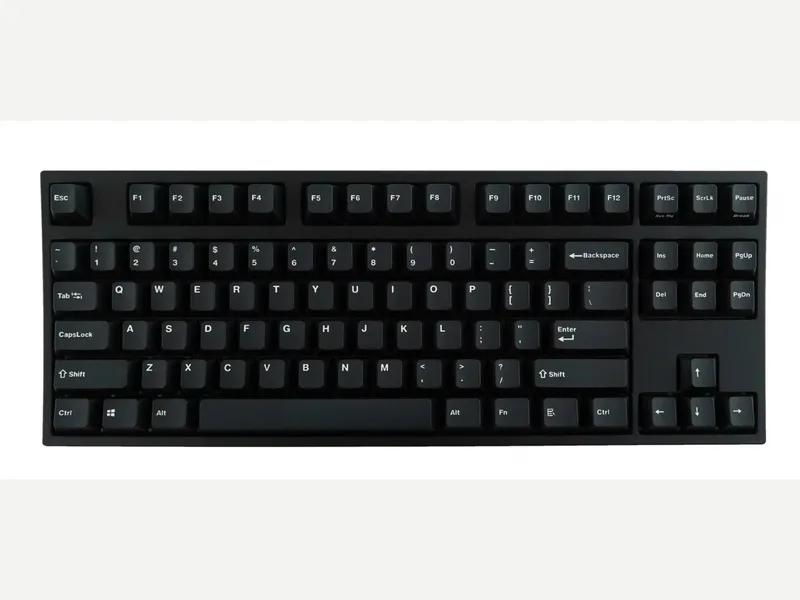
Leopold
Leopold FC750R PD
Released 2018
Researched from maker specs and published sources. Last checked Oct 18, 2026.
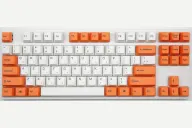
Leopold's 87-key Cherry MX TKL with a sound-absorbing pad
A wired 87-key TKL with Cherry MX switches, thick double-shot PBT keycaps and a sound-absorbing pad over a steel plate. Tom's Guide called the typing experience fantastic and the build excellent; it has a single height setting and a cheap keycap puller.
Sources
Our take, based on research
A plain, well-built TKL that Tom's Guide rates for its typing experience. Pick it for build and keycaps; look elsewhere for hot-swap, wireless, RGB or app support.
Overview
The FC750R PD is the tenkeyless Leopold. Tom's Guide describes a thick plastic case with a steel-mounted plate and extra padding that dampens the spacebar, DIP switches on the back for swapping keys such as Left Ctrl and Caps Lock, and a menu key the reviewer came to value. It comes with a removable 48-inch mini-USB cable that can be routed left, right or centre, plus a PS/2-to-USB-A converter and a plastic dust cover. Leopold sells it with seven Cherry MX options (Brown, Blue, Red, Black, Silent Red, Clear and Silver) and the review describes the PBT double-shot keycaps as thick and crisp. Leopold's own product pages show the specification sheet as images, so the details here come from the review; Tom's Guide gives a weight of 2.2 pounds, about 1 kg.
Tom's Guide judged the build excellent, the design straightforward and the typing experience fantastic, with a Cherry MX Brown unit it found just right for tactile feel without waking a cubicle-mate. Its cons were a single height adjustment (it wanted two elevation levels) and a cheap plastic keycap puller that it recommended replacing with a metal one. It describes the keyboard as aimed at enthusiasts who can live without a number pad and do not need gaming extras.
There is no RGB, software or hot-swap, so the switch choice is made at purchase.
Pros & Cons
- Tom's Guide found the build quality excellent and the typing experience fantastic
- Thick double-shot PBT keycaps (Tom's Guide)
- Steel-mounted plate with padding that dampens the spacebar (Tom's Guide)
- DIP switches for swapping keys such as Left Ctrl and Caps Lock, and a useful menu key (Tom's Guide)
- Seven Cherry MX switch choices at purchase (Tom's Guide)
- Plug and play with no software to install
- Only one height setting; Tom's Guide wanted two
- Cheap plastic keycap puller that Tom's Guide said could scratch the keycaps
- Mini-USB cable rather than USB-C (Tom's Guide)
- No hot-swap, RGB or wireless, and no number pad
- Switch choice is fixed at purchase
Who Is This For?
- Typists who want a TKL without extras
- Office users who value a quiet-ish, solid Cherry MX board
- People moving up from a standard office keyboard
- Gamers who want RGB or software
- Hot-swap hobbyists
- Anyone who needs a number pad or USB-C
Where to Buy
Dimensions
362 x 140 x 33mm
Weight
1kg
Case Material
ABS plastic
Connectivity
Wired
Plate Options
Case Colors
Software Support
Similar Keyboards
View all
Looking for something different?
Browse All Keyboards