Leopold
Leopold FC660M PD
Released 2017
Researched from maker specs and published sources. Last checked Oct 18, 2026.
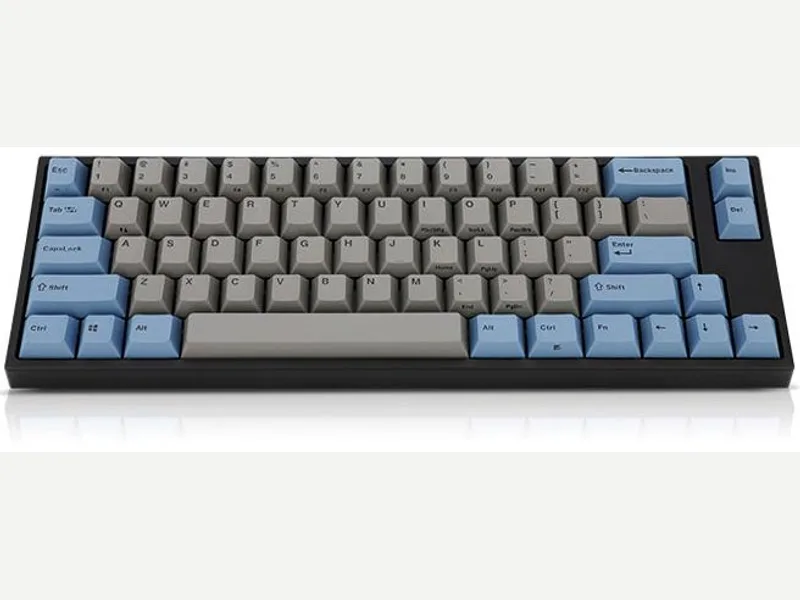
Leopold's 66-key Cherry MX board with real arrow keys
A wired 66-key compact board with Cherry MX switches, thick double-shot PBT keycaps, a steel-plate tray build and a sound-absorbing pad. Reviewers praise the build, stabilizers and keycaps; mini-USB and non-standard modifier keys are the downsides.
Sources
Our take, based on research
A well-reviewed, no-frills compact board that gets its praise for build, stabilizers and keycaps. Choose it if you want a finished 66-key board; skip it if you want hot-swap, USB-C or custom keycaps.
Overview
Leopold's FC660M PD is a 66-key layout that keeps a dedicated arrow cluster and two extra navigation keys in a footprint close to a 60% board. Leopold sells it with a choice of Cherry MX switches; Tech Critter lists seven (Red, Brown, Black, Blue, Silent Red, Silver and Clear) and describes the keycaps as 1.5 mm double-shot PBT. Leopold's own product page shows the specification sheet as images, so the details here come from the reviews: a conventional case with a top cover, Cherry-style stabilizers, padding between the back plate and PCB, a detachable USB Mini-B cable and rubber feet with a kickstand.
Tech Critter, whose review unit had Cherry MX Browns, found the build excellent and the stabilizers more stable than on similar boards, which it guessed were factory pre-lubed, and called the keycaps the fanciest stock set it had seen on a mass-produced keyboard. Its cons were the mini-USB port and the cost. Techtesters scored it 9 out of 10 on a Cherry MX Blue unit, calling it rock-solid with neat PBT caps, a damping layer and Cherry stabilizers; it found the Blues loud and wanted USB-C, an English manual and feet that did not collapse so easily. The 66-key layout changes the left Windows key and right Shift, so standard custom keycap sets will not fit, as Tech Critter noted.
It has no hot-swap sockets, backlight or software.
Pros & Cons
- Solid build that both Tech Critter and Techtesters praised, with no noticeable flex (Techtesters)
- Stable Cherry-style stabilizers and a padded spacebar (Tech Critter)
- Thick 1.5 mm double-shot PBT keycaps with fine legends (Tech Critter, Techtesters)
- Seven Cherry MX switch choices at purchase (Tech Critter)
- Keeps arrow keys and a compact footprint in a 66-key layout
- Detachable cable
- Mini-USB connection, which both Tech Critter and Techtesters would swap for USB-C
- Right Shift and left Windows key are non-standard, so standard custom keycap sets will not fit (Tech Critter)
- Switches are fixed at purchase, with no hot-swap
- Techtesters found the feet too easy to fold in and wanted an English manual
- Cherry MX Blue units are loud (Techtesters)
Who Is This For?
- Typists who want a compact board with real arrow keys
- Buyers who want PBT keycaps and Cherry MX without any configuration
- People who like a no-software, no-RGB desk
- Hot-swap or custom keycap shoppers
- Wireless or RGB users
- Anyone who needs USB-C
Where to Buy
Dimensions
325 x 109mm
Weight
700g
Case Material
ABS plastic
Connectivity
Wired
Plate Options
Case Colors
Software Support
Similar Keyboards
View all
Looking for something different?
Browse All Keyboards