Compare
Pick two boards from the directory and see how they differ.
Shaded rows are where they differ.
| Spec | 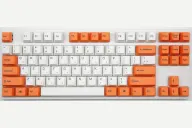 Varmilo Varmilo VA87M $126–$169 “Varmilo's wired Cherry MX TKL with dye-sub PBT and quiet stabilizers” | 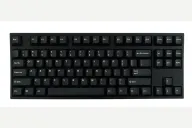 Leopold Leopold FC750R PD $119–$199 “Leopold's 87-key Cherry MX TKL with a sound-absorbing pad” |
|---|---|---|
| Price , different | $126–$169 | $119–$199 |
| Size | TKL | TKL |
| Type | Pre-built | Pre-built |
| Connectivity | Wired | Wired |
| Released , different | 2016 | 2018 |
| Mounting | Tray Mount | Tray Mount |
| Case | ABS plastic | ABS plastic |
| Colors , different | Many dye-sub themes | Black, Grey/Blue, White, Navy |
| Weight , different | 940g | 1kg |
| Dimensions , different | 356 x 134 x 33mm | 362 x 140 x 33mm |
| Typing angle | Adjustable feet | Adjustable feet |
| Front height , different | 33mm | 33mm case height |
| Switches | Mechanical | Mechanical |
| Profile | Standard | Standard |
| Keycaps , different | Dye-sub PBT | 1.5mm doubleshot PBT |
| PCB , different | Soldered Cherry MX, white LED | Soldered Cherry MX, plate mount |
| Plates | Steel | Steel |
| Compatible switches | Fixed Cherry MX, chosen at purchase | Fixed Cherry MX, chosen at purchase |
| Software , different | None | Dip switches |
| NKRO | Yes | Yes |
| RGB | No | No |
| Features , different | TKL, Cherry MX, Dye-sub PBT, White LED, Lubed stabilizers, Case foam | TKL, Cherry MX, Doubleshot PBT, Sound-absorbing pad, Plate mount, Dip switches |
| Good for , different | Typists who want a quiet-ish, solid Cherry MX TKL People who care about stabilizers and keycaps Buyers who like themed colorways | Typists who want a TKL without extras Office users who value a quiet-ish, solid Cherry MX board People moving up from a standard office keyboard |
| Skip if , different | Hot-swap or wireless shoppers RGB or macro users Anyone who needs USB-C | Gamers who want RGB or software Hot-swap hobbyists Anyone who needs a number pad or USB-C |
| Pros , different | Switch and Click called the stabilizers the best on any prebuilt keyboard, with no spacebar rattle Genuine Cherry MX switches in many varieties, including silent options (MechanicalKeyboards.com) Dye-sublimated PBT keycaps (MechanicalKeyboards.com, Switch and Click) Sturdy case with no creaking and a metal plate (Switch and Click) Plug-and-play with no software to install Full N-key rollover (MechanicalKeyboards.com) | Tom's Guide found the build quality excellent and the typing experience fantastic Thick double-shot PBT keycaps (Tom's Guide) Steel-mounted plate with padding that dampens the spacebar (Tom's Guide) DIP switches for swapping keys such as Left Ctrl and Caps Lock, and a useful menu key (Tom's Guide) Seven Cherry MX switch choices at purchase (Tom's Guide) Plug and play with no software to install |
| Cons , different | Mini-USB port rather than USB-C (Switch and Click) No hot-swap, so switches are fixed at purchase (MechanicalKeyboards.com) No RGB or macro software; most versions have only white or no backlight (Switch and Click) Legends hard to read on dark keycaps in the dark (Switch and Click) A Geekhack reply said the spacebar stabilizer tilted over time Plastic ABS frame (MechanicalKeyboards.com) | Only one height setting; Tom's Guide wanted two Cheap plastic keycap puller that Tom's Guide said could scratch the keycaps Mini-USB cable rather than USB-C (Tom's Guide) No hot-swap, RGB or wireless, and no number pad Switch choice is fixed at purchase |
| Research take , different | A long-running prebuilt favorite for stabilizers and keycaps, still without hot-swap, USB-C or software. Choose it for feel and looks and expect a plain, wired board. | A plain, well-built TKL that Tom's Guide rates for its typing experience. Pick it for build and keycaps; look elsewhere for hot-swap, wireless, RGB or app support. |