Compare
Pick two boards from the directory and see how they differ.
Shaded rows are where they differ.
| Spec | 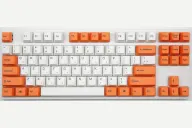 Varmilo Varmilo VA87M $126–$169 “Varmilo's wired Cherry MX TKL with dye-sub PBT and quiet stabilizers” | 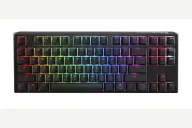 Ducky Ducky One 3 TKL $99–$125 “Ducky's wired hot-swap TKL with PBT keycaps and Cherry MX” |
|---|---|---|
| Price , different | $126–$169 | $99–$125 |
| Size | TKL | TKL |
| Type | Pre-built | Pre-built |
| Connectivity | Wired | Wired |
| Released , different | 2016 | 2021 |
| Mounting | Tray Mount | Tray Mount |
| Case | ABS plastic | ABS plastic |
| Colors , different | Many dye-sub themes | Classic, Matcha, and other colorways |
| Weight , different | 940g | About 950 g (Ducky); Tom's Guide and Neowin list about 908 g |
| Dimensions , different | 356 x 134 x 33mm | 370 x 140 x 40mm |
| Typing angle , different | Adjustable feet | 3-level feet |
| Front height , different | 33mm | 40mm |
| Switches | Mechanical | Mechanical |
| Profile | Standard | Standard |
| Keycaps , different | Dye-sub PBT | Doubleshot PBT, Cherry profile |
| PCB , different | Soldered Cherry MX, white LED | Hot-swap, per-key RGB |
| Plates | Steel | Steel |
| Compatible switches , different | Fixed Cherry MX, chosen at purchase | MX-style |
| Software , different | None | Onboard macros |
| NKRO | Yes | Yes |
| RGB , different | No | Yes |
| Features , different | TKL, Cherry MX, Dye-sub PBT, White LED, Lubed stabilizers, Case foam | Hot-swap, Cherry MX, Doubleshot PBT, Per-key RGB, QUACK dampening, Detachable USB-C |
| Good for , different | Typists who want a quiet-ish, solid Cherry MX TKL People who care about stabilizers and keycaps Buyers who like themed colorways | Typists who want Cherry MX and PBT keycaps on a TKL from the factory Buyers who want hot-swap in a no-fuss wired board Anyone who likes bold colorways without relying on software |
| Skip if , different | Hot-swap or wireless shoppers RGB or macro users Anyone who needs USB-C | Wireless users People who want app-based remapping or QMK Mac users who need full function-key support (Tom's Guide) |
| Pros , different | Switch and Click called the stabilizers the best on any prebuilt keyboard, with no spacebar rattle Genuine Cherry MX switches in many varieties, including silent options (MechanicalKeyboards.com) Dye-sublimated PBT keycaps (MechanicalKeyboards.com, Switch and Click) Sturdy case with no creaking and a metal plate (Switch and Click) Plug-and-play with no software to install Full N-key rollover (MechanicalKeyboards.com) | Hot-swappable PCB, so switches can be changed without soldering (Tom's Guide) Double-shot PBT keycaps and Cherry MX switches (Ducky) Tom's Guide called the typing experience outstanding and the typing sound lovely Tom's Guide found the build quality great, with a weight that stays put on the desk Three foot angles and a detachable USB-C cable (Tom's Guide, Ducky) |
| Cons , different | Mini-USB port rather than USB-C (Switch and Click) No hot-swap, so switches are fixed at purchase (MechanicalKeyboards.com) No RGB or macro software; most versions have only white or no backlight (Switch and Click) Legends hard to read on dark keycaps in the dark (Switch and Click) A Geekhack reply said the spacebar stabilizer tilted over time Plastic ABS frame (MechanicalKeyboards.com) | Wired only, with no Bluetooth or dongle (Tom's Guide) No companion software; macros and lighting are set by key combinations (Tom's Guide, IGN Middle East) Tom's Guide noted limited macOS support and a firmware update that is available only for Windows IGN Middle East found the stabilizers needed fine-tuning for the sound to match the board's build Plain wired feature set compared with Keychron or Akko boards that add QMK/VIA (IGN Middle East) |
| Research take , different | A long-running prebuilt favorite for stabilizers and keycaps, still without hot-swap, USB-C or software. Choose it for feel and looks and expect a plain, wired board. | A solid-feeling wired TKL that reviewers like for typing, held back by missing wireless and software. Tom's Guide questioned its cost; choose it for the Cherry feel and keycaps, not for features. |