Compare
Pick two boards from the directory and see how they differ.
Shaded rows are where they differ.
| Spec | 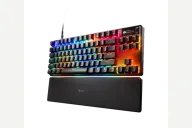 SteelSeries SteelSeries Apex Pro TKL Gen 3 $190–$240 “SteelSeries' TKL with adjustable Hall-effect switches and an OLED screen” | 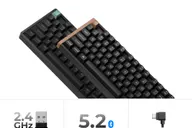 Keychron Keychron K8 HE $130–$140 “Wireless 80% Hall-effect board with Rapid Trigger” |
|---|---|---|
| Price , different | $190–$240 | $130–$140 |
| Size | TKL | TKL |
| Type | Pre-built | Pre-built |
| Connectivity , different | Wired | Wireless + Wired |
| Released , different | 2024 | 2025 |
| Mounting , different | Integrated Plate | Tray Mount |
| Case | Aluminum | Aluminum |
| Colors | Black, White | Black, White |
| Weight , different | Listed around 1.6kg | Approx. 1185 g |
| Dimensions , different | TKL | 359.2 x 129.2 mm (Special Edition: 363.2 x 129.2 mm) |
| Typing angle , different | Adjustable feet | Not listed |
| Front height | Not listed | Not listed |
| Switches | Hall Effect | Hall Effect |
| Profile | Standard | Standard |
| Keycaps , different | PBT | Cherry Profile Double-shot keycaps, shine-through |
| PCB , different | OmniPoint 3.0, per-key RGB, OLED | Hot-swap |
| Plates , different | Aluminum frame | Not listed |
| Battery , different | — | 4000 mAh, up to 110 hours |
| Compatible switches , different | SteelSeries OmniPoint | Keychron magnetic switches |
| Software , different | SteelSeries GG | QMK, Keychron Launcher |
| NKRO | Yes | Yes |
| RGB , different | Yes | No |
| Features , different | OmniPoint 3.0, Rapid Trigger, OLED display, Aluminum frame, PBT keycaps, USB-C, Per-key RGB | TKL layout, Tri-mode, Hot-swap, QMK/VIA, Hall effect |
| Good for , different | Competitive players who want per-key actuation and Rapid Trigger Desk setups that want a compact TKL with a screen Gamers who also type a lot and like a muted thock | Gamers who want a TKL Hall-effect keyboard with a dongle Typists who like a heavy, solid-feeling board Users who want to tune actuation per key |
| Skip if , different | Buyers who want hot-swap switches or custom keycaps Wireless users, unless they pick the wireless version of this board People who want a full set of dedicated media keys | Anyone who wants tactile or clicky switches Buyers who want a plastic, lighter build People who need a wireless-only software setup |
| Pros , different | OmniPoint 3.0 Hall-effect switches adjustable from 0.1 to 4.0 mm with Rapid Trigger (SteelSeries) TechRadar praised the analog switches, durable build and software tweaks, including per-key actuation PC Gamer called the typing feel immaculate, with a muted thock Double-shot PBT keycaps and a detachable braided USB-C cable (SteelSeries) OLED Smart Screen for profiles, actuation and system info (SteelSeries, TechRadar) Light enough to carry for a metal-topped board, under a kilogram according to PC Gamer | Rapid Trigger and adjustable actuation (maker) Aluminum case; Windows Central praised the typing and gaming feel 2.4 GHz, Bluetooth and wired connection Balanced 80% layout (Windows Central) Shine-through keycaps |
| Cons , different | Wired only with no USB passthrough, which PC Gamer said hurt its first impression at this price, though it concluded the board earns that price PCMag heard a hollow sound and a rattly spacebar, and found the switches fixed Laptop Mag found the recessed scroll wheel uncomfortable and the OLED cramped TechRadar noted no controller emulation and a short, flat wrist rest GG gives no visual feedback while adjusting actuation (TechRadar) Case is aluminum on top and plastic below, not all aluminum (PC Gamer, PCMag) | Limited to compatible Hall-effect switches (Windows Central, maker) Software needs a wired connection and the included cable is short (Windows Central) Heavy at about 1185 g Battery rated at 110 hours, below the Max boards No independent review beyond Windows Central was opened |
| Research take , different | A well-liked analog TKL for competitive players, praised for its switches and feel. The OLED, scroll wheel and fixed switches draw complaints, so it suits tuners more than tinkerers. | A well-regarded TKL Hall-effect board. Choose the K8 Max if you want ordinary switches. |