Compare
Pick two boards from the directory and see how they differ.
Shaded rows are where they differ.
| Spec | 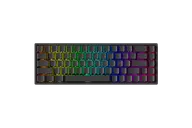 MonsGeek MonsGeek FUN68 HE $35 “The cheap magnetic 65%” | 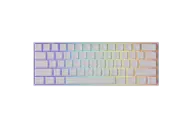 MonsGeek MonsGeek FUN60 $30–$50 “The cheap magnetic 60%” |
|---|---|---|
| Price , different | $35 | $30–$50 |
| Size , different | 65% | 60% |
| Type | Pre-built | Pre-built |
| Connectivity , different | Wired | Wireless + Wired |
| Released , different | 2025 | 2024 |
| Mounting , different | Integrated Plate | Tray Mount |
| Case | Plastic | Plastic |
| Colors | Black | Black |
| Weight | Not listed | Not listed |
| Dimensions | Not listed | Not listed |
| Typing angle | Not listed | Not listed |
| Front height | Not listed | Not listed |
| Switches | Hall Effect | Hall Effect |
| Profile | Standard | Standard |
| Keycaps | Not listed | Not listed |
| PCB | Hot-swap magnetic | Hot-swap magnetic |
| Plates , different | Not listed | Aluminum |
| Software | MonsGeek | MonsGeek |
| NKRO | Yes | Yes |
| RGB | Yes | Yes |
| Features , different | Hall effect, 65%, Rapid trigger | Hall effect, 60%, Tri-mode, Rapid trigger |
| Good for , different | Newcomers to Rapid Trigger who want arrows Players who also type and browse on the same board Budget buyers who want 8K polling without wireless | Gamers who want Rapid Trigger on a tight budget Small desks and low-sensitivity mouse players who want the keyboard out of the way First-time magnetic-switch buyers |
| Skip if , different | Anyone who needs wireless Buyers who want a metal case or a gasket feel People who need an F-row (Spine points to the TAC75 HE for that) | Anyone who needs arrows or F-keys for daily work Typists who want a heavy, deep-sounding case Buyers who want open-source firmware (ComputerBase points to the Skiller SGK50 for that) |
| Pros , different | Arrow keys in a 65% layout, so it can double as an everyday keyboard Rapid Trigger precision to 0.005 mm with an RT Stabilizer filter and 8,000 Hz wired polling Bottom foam fixes the empty-case echo of the FUN60, per Spine's review Supports 7+ third-party magnetic switches (MonsGeek) Double-shot PBT side-printed keycaps and a two-stage tilt stand (Spine) | Native 8,000 Hz polling over USB, plus 2.4GHz on the tri-mode version (MonsGeek) Rapid Trigger down to 0.01 mm and per-key actuation from 0.1 mm in the web driver Aluminum plate in a tray-mounted case, with pre-lubed stabilizers and double-shot PBT keycaps (MonsGeek) Cross-compatible with several third-party N-pole magnetic switches Wired or tri-mode (Bluetooth 5.0, 2.4GHz, USB-C) with a 3,000 mAh battery on the tri-mode build ComputerBase called it a good entry point to analog and small-form-factor boards |
| Cons , different | Wired only Plastic (ABS) case and a tray mount, so no gasket-style softness (Spine) Stock stabilizers are average and fairly loud (Spine) No function row, and Spine notes some RGB features need a browser plugin Only a limited list of switches is guaranteed to reach 0.01 mm accuracy (MonsGeek) | No arrow keys or function row; TechNuovo says it is hard to recommend for work as well as games Plastic case: TechteamGB found it light but not very rigid, and ComputerBase found the sound only okay Software runs in the browser and ComputerBase found it flexible but not polished everywhere After a switch swap the board needs recalibrating in the driver (MonsGeek) Akko's S-pole Creamy Yellow switches are not compatible Rapid Trigger boards can be restricted or banned in some games and tournaments (TechNuovo) |
| Research take , different | A sensible budget magnetic 65%: arrows, bottom foam and an improved driver make it a more rounded daily board than the FUN60. Only one detailed independent review was found, and it is in Japanese. | A cheap, compact way into Rapid Trigger that reviewers rate well for gaming and more modestly for sound and build. If you also type a lot, the FUN68 HE (arrows, bottom foam) or the aluminum FUN60 Ultra is the better step up. |