Compare
Pick two boards from the directory and see how they differ.
Shaded rows are where they differ.
| Spec | 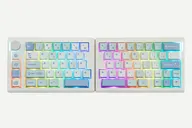 EPOMAKER EPOMAKER Split70 $99–$116 “An affordable 70% split with tri-mode wireless, gasket mount and a knob” | 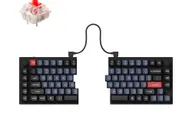 Keychron Keychron Q11 $205 “Split 75% aluminum Q with a knob on each half” |
|---|---|---|
| Price , different | $99–$116 | $205 |
| Size | Split | Split |
| Type | Pre-built | Pre-built |
| Connectivity , different | Wireless + Wired | Wired |
| Released , different | 2025 | 2023 |
| Mounting , different | Gasket | Tray Mount |
| Case , different | ABS plastic | All-metal |
| Colors , different | Black Grey, White Blue | Carbon Black - A, Carbon Black - B, Carbon Black |
| Weight , different | Not listed | 1186 ± 10 g (fully assembled) |
| Dimensions , different | 18.4 cm + 18.8 cm long (left + right), 11.8 cm wide, 4 cm high | 75% |
| Typing angle , different | No adjustable feet (IBTimes UK) | Not listed |
| Front height , different | 4 cm | Not listed |
| Switches | Mechanical | Mechanical |
| Profile | Standard | Standard |
| Keycaps , different | PBT dye-sublimated, Cherry profile | Double-shot PBT |
| PCB | Hot-swap | Hot-swap |
| Plates , different | PC plate | Not listed |
| Battery , different | 3000 mAh; up to 11 hours with backlight on, 260 hours off (Epomaker) | — |
| Compatible switches , different | 3- and 5-pin MX-style | MX-style |
| Software , different | VIA | QMK, Keychron Launcher |
| NKRO | Yes | Yes |
| RGB , different | Yes | No |
| Features , different | 71 keys + knob, Tri-mode, Gasket mount, Hot-swap, VIA, RGB, Macro keys | 75% layout, Wired, Hot-swap, QMK/VIA, Knob |
| Good for , different | Buyers who want to try a split on a budget People who want a mostly standard staggered layout Wireless desk setups | People who want a split board for posture comfort Macro-heavy workflows Users who want a premium metal split with VIA |
| Skip if , different | People who need tenting or adjustable angles Shortcut-heavy users who rely on a right Ctrl Buyers who want a premium metal build | Anyone who expects tenting out of the box Buyers who want wireless People who need a short learning curve |
| Pros , different | Low price for a wireless split (Epomaker, IBTimes UK) Bluetooth, 2.4 GHz and wired modes (Epomaker) Hot-swap with factory-lubed linear switches (Epomaker) Knob and four macro keys (IBTimes UK) VIA support (Epomaker) | Fully split design with adjustable spacing and angle (PCWorld) Premium all-metal construction at about 1.2 kg (Keychron) Dedicated macro keys and a knob on each half (Tom's Guide, PCWorld) Highly customizable with QMK/VIA (Tom's Guide, PCWorld) Hot-swap sockets and a 75% layout with function and arrow keys PCWorld rated its price competitive against cheaper ergonomic boards |
| Cons , different | No adjustable feet or tenting (IBTimes UK) Tiny right Shift and shifted right number row (HL Planet) No right Ctrl key (IBTimes UK) Battery life drops sharply with RGB on (IBTimes UK) Mostly plastic construction (IBTimes UK) | Steep learning curve (Tom's Guide) No tenting kit or wrist rest (Tom's Guide, PCWorld) Short cable between modules (Tom's Guide) Slightly awkward layout around the left spacebar (PCWorld) Wired only Expensive (Tom's Guide) |
| Research take , different | A cheap, wireless entry to split typing. Reviewers like the price and features and mainly fault the layout compromises, the lack of feet and the RGB battery life. | A well-regarded premium split keyboard. Reviewers liked the build and customization and mainly faulted the missing tenting kit, short cable and layout quirks. |