HyperX
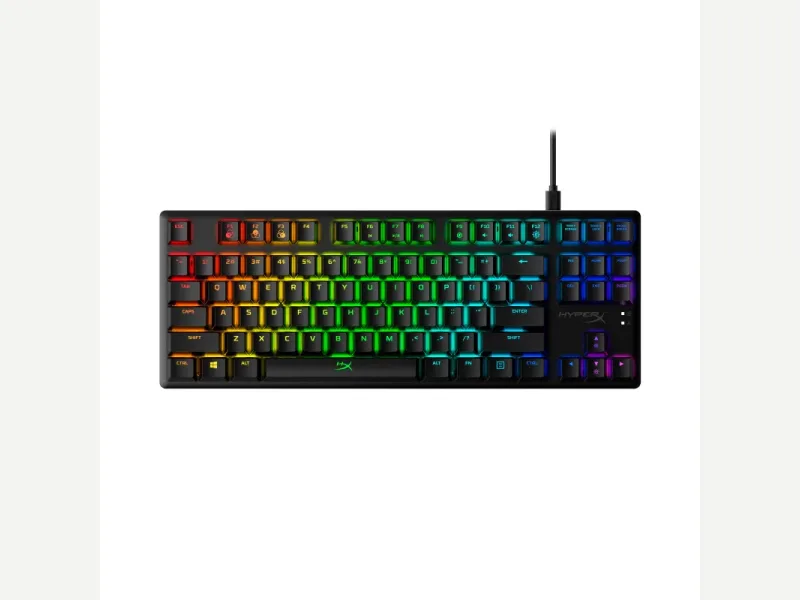
HyperX Alloy Origins Core
Released 2020
Researched from maker specs and published sources. Last checked Oct 18, 2026.
HyperX's aluminum-bodied TKL with red or aqua switches
A wired TKL with a full aluminum body, HyperX Red linear or Aqua tactile switches, a detachable USB-C cable and per-key RGB. ZDNet loved the case but called the keycaps among the worst it had reviewed; TweakTown rated it highly.
Sources
Our take, based on research
A well-built aluminum TKL held back by its stock keycaps and NGENUITY's lighting menus, according to ZDNet. A good base if you are happy to replace the caps.
Overview
The Alloy Origins Core is HyperX's tenkeyless board with a full aluminum body. HyperX's page lists custom HyperX switches in Red (linear) or Aqua (tactile) with an 80-million-keypress rating, a detachable USB-C to USB-A braided cable, three tilt angles of 3°, 7° and 11°, onboard memory for three profiles, N-key rollover, and NGENUITY software for lighting and macros. The listed weight is 1.98 lb with the cable, and the footprint is 360 by 132.5 mm. ZDNet praised the rock-solid case, bright RGB and an office-friendly look, and the NGENUITY key remapping, but called the keycaps some of the worst it had reviewed, plasticky and rattly and prone to shine within minutes, and found NGENUITY's lighting settings unintuitive. The reviewer suggested a cheap aftermarket keycap set as the fix. HyperX's page does not state the keycap material. TweakTown rated the board well for build and lighting, but said the 45 g figure HyperX quotes for its switches is reached before the Aqua's tactile bump, putting the real force to actuate nearer 60 g. The switches are fixed rather than hot-swap, the board is wired only, and HyperX lists Windows-only OS compatibility for the software. In short, it pairs a solid metal frame with a flexible but fiddly NGENUITY and a weak stock keycap set. It suits gamers who want a compact, rigid board and plan to swap the keycaps.
Pros & Cons
- Full aluminum body that ZDNet called rock-solid and TweakTown praised
- Choice of Red linear or Aqua tactile switches with an 80-million-keypress rating (HyperX)
- Detachable braided USB-C cable (HyperX, ZDNet)
- Three tilt angles of 3°, 7° and 11° (HyperX)
- Three onboard profiles and per-key remapping in NGENUITY (HyperX, ZDNet)
- Compact TKL layout that works with PC and consoles (HyperX)
- ZDNet called the keycaps among the worst it had reviewed, quick to shine and rattly
- TweakTown said the Aqua switch needs closer to 60 g to actuate, more than the listed figure
- NGENUITY lighting settings were found unintuitive (ZDNet)
- Switches are fixed, with no hot-swap
- HyperX lists Windows-only OS compatibility for NGENUITY
- HyperX's page does not state the keycap material
Who Is This For?
- Gamers who want a compact aluminum TKL
- Buyers who will replace the keycaps
- Console and PC players who want a detachable cable
- People who want good stock keycaps
- Hot-swap or wireless shoppers
- Typists who want a light tactile switch
Where to Buy
Dimensions
360 x 132.5 x 34.5mm
Weight
About 900 g with cable (1.98 lb, HyperX)
Case Material
Aluminum
Connectivity
Wired
Plate Options
Case Colors
Software Support
Similar Keyboards
View all
Looking for something different?
Browse All Keyboards