Compare
Pick two boards from the directory and see how they differ.
Shaded rows are where they differ.
| Spec |  MoErgo MoErgo Go60 $300–$315 “A compact 60-key travel split with dual touchpads, hot-swap Choc switches and a case” | 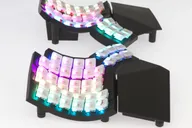 MoErgo MoErgo Glove80 $369–$425 “A wireless, concave split with a 6-key thumb cluster and continuous tenting” |
|---|---|---|
| Price , different | $300–$315 | $369–$425 |
| Size | Split | Split |
| Type | Pre-built | Pre-built |
| Connectivity | Wireless + Wired | Wireless + Wired |
| Released , different | 2025 | 2023 |
| Mounting | Not listed | Not listed |
| Case , different | Steel and PC/ABS injection-molded plastic | Not listed |
| Colors | Grey, White | Grey, White |
| Weight , different | 600 g | Approx. 600 g |
| Dimensions , different | 173 mm wide x 127 mm deep x 17.5 mm high (MoErgo spec; per half not stated) | 372 mm wide x 168 mm deep (206 mm with palm rests) x 60 mm high |
| Typing angle , different | Magnetic detachable tenting, 6 settings from 6.2 to 17.0 degrees | Built-in, continuously adjustable tenting; angles not listed |
| Front height , different | 17.5 mm | 20 mm from the desk to the top of the lowest keycap |
| Switches | Low Profile | Low Profile |
| Profile | Low Profile | Low Profile |
| Keycaps | Translucent POM, MCC profile | Translucent POM, MCC profile |
| PCB , different | Hot-swap | Soldered switches (hot-swap not listed) |
| Plates | Not listed | Not listed |
| Battery , different | 2 x 1000 mAh LiPo; LEDs off: 1-2 weeks (left), 1 month+ (right) | Estimated 2-4 weeks (left) and 2+ months (right) with LEDs off |
| Compatible switches , different | Kailh Choc v1 (Choc v2 also fits per Ben Frain) | Kailh Choc v1 (Red linear, Brown tactile, White clicky; silent Cherry or Plum Blossom) |
| Software | ZMK, MoErgo Layout Editor | ZMK, MoErgo Layout Editor |
| NKRO | No | No |
| RGB | Yes | Yes |
| Features , different | 60 keys, Hot-swap, Dual trackpads, Bluetooth and wired, Magnetic tenting, ZMK, Travel case | 80 keys, Concave key wells, Wireless, Choc low-profile, Built-in tenting, ZMK |
| Good for , different | Travelers who want an ergonomic split People who want a pointing device built in Users who want hot-swap and wireless in a small board | People who want a key-well split with built-in tenting Wireless users who want ZMK Typists who will invest time in relearning |
| Skip if , different | People who want concave key wells Buyers who need standard MX-spaced keycaps Anyone who wants precise trackpad control | Gamers Anyone who wants hot-swap switches Buyers who want a short learning curve |
| Pros , different | Compact 60-key layout with dedicated arrows (Ben Frain) Two integrated touchpads (MoErgo) Hot-swap Choc v1 switches (MoErgo) Bluetooth LE, USB and an automatic wired TRRS mode (MoErgo) Travel case included (MoErgo) | Concave key wells with a curved thumb cluster (MoErgo) Built-in, continuously adjustable tenting (MoErgo) Wireless with 4 Bluetooth profiles and a travel case (MoErgo, PC Gamer) Simple remapping through a web editor (PC Gamer) Most comfortable board for its reviewer (The Gadgeteer) |
| Cons , different | Touchpads are a backup, not a replacement for a mouse for some users (Ben Frain) Palm rests are an extra USD 120 (Ben Frain, MoErgo) Custom key spacing is neither MX nor Choc standard (Ben Frain) Columnar layout needs a learning period | Tough adaptation period (PC Gamer) Seriously expensive for a keyboard (PC Gamer) Does not feel as plush as expected (PC Gamer) Switches are soldered; no hot-swap listed (MoErgo) Not for gaming (PC Gamer) |
| Research take , different | A portable split with built-in touchpads. The reviewer we cite praised the build, connection reliability and travel case, and mainly noted the palm rests are extra and the touchpads are limited. | A very adjustable, wireless key-well split. Reviewers rate the ergonomics highly and mainly fault the learning curve, the price and the soldered switches. |