Compare
Pick two boards from the directory and see how they differ.
Shaded rows are where they differ.
| Spec | 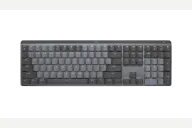 Logitech Logitech MX Mechanical $150–$180 “Logitech's low-profile wireless full-size for multi-device offices” | 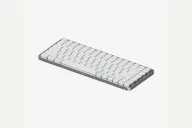 Lofree Lofree Flow84 $119–$159 “Lofree's slim aluminum 75% with gasket mount and Bluetooth” |
|---|---|---|
| Price , different | $150–$180 | $119–$159 |
| Size , different | Full | 75% |
| Type | Pre-built | Pre-built |
| Connectivity , different | Wireless | Wireless + Wired |
| Released , different | 2022 | 2023 |
| Mounting , different | Integrated Plate | Gasket |
| Case , different | Plastic chassis, aluminum top plate | Aluminum alloy |
| Colors , different | Graphite, Pale Gray | White, Black |
| Weight , different | 828g | 594g |
| Dimensions , different | 433.9 x 131.7mm | 316 x 126 x 24.5mm |
| Typing angle , different | Low profile | 3.9° |
| Front height , different | 7.8mm | 24.5mm |
| Switches | Low Profile | Low Profile |
| Profile | Low Profile | Low Profile |
| Keycaps , different | Low-profile, dual-color legends | Dye-sub PBT |
| PCB , different | Fixed Kailh low-profile switches | Hot-swap low-profile |
| Plates , different | Aluminum top plate | Integrated |
| Battery , different | Rated 15 days with backlight | 2000mAh |
| Compatible switches , different | Fixed, chosen at purchase | Lofree / Kailh low-profile |
| Software , different | Logi Options+ | Fn shortcuts |
| NKRO | Yes | Yes |
| RGB , different | No | Yes |
| Features , different | Low profile, Full size with numpad, Logi Bolt + Bluetooth, Easy-Switch for 3 devices, Smart backlight, USB-C charging | Low profile, 75%, Gasket mount, Hot-swap, Aluminum, Bluetooth 5.0 + USB-C, 2000mAh |
| Good for , different | Office workers who switch between a Mac, PC and tablet Logitech MX mouse and Logi Flow users People who want a quiet mechanical feel with a numpad | People who want a slim, stylish aluminum 75% Wired-or-Bluetooth users who carry a board between desks Typists who like low-profile POM switches |
| Skip if , different | Gamers who want macros, RGB or fast polling Switch or keycap customizers Anyone who needs a wrist rest | Buyers who want remapping software or QMK/VIA Gamers who want 2.4 GHz Anyone who needs long battery life |
| Pros , different | Easy-Switch for up to three devices over Logi Bolt or Bluetooth (Logitech, Macworld) Long battery life, rated for 15 days with backlight and 10 months without (Logitech, PCMag) Tom's Hardware and PCMag found the typing feel very good, with Macworld praising minimal wobble on tactile switches Smart backlight that wakes as hands approach (Logitech, PCMag) Choice of tactile quiet, clicky or linear Kailh Choc V2 switches (Tom's Hardware, PCMag) Aluminum top plate in a plastic case made with recycled plastic (Tom's Hardware, PCMag) | Aluminum frame with virtually no flex (Tom's Guide, PCMag) Kailh POM switches that Tom's Guide and PCMag found comfortable to type on Gasket mount and low-profile PBT keycaps (Lofree, LTT Labs) Hot-swap sockets (Lofree, LTT Labs) Bluetooth with up to three devices, and wired USB-C (Lofree) Compact and light at about 594 g (Lofree) |
| Cons , different | Switches are fixed at purchase, with no hot-swap (PCMag) How-To Geek found rigid switches, shaky stabilizers and off-kilter keycaps Low profile rules out standard wrist rests (Tom's Hardware) Options+ lacks macro programming (Macworld) and remaps only 24 keys (How-To Geek) USB-C cable is charge-only (PCMag) Backlight is white only, with no RGB colors (Tom's Hardware) | Tom's Guide called the battery weak: five days at about six hours a day in its spec box, about a week of work in its text Switch options are rigid, and colors and switches cannot be mixed (Tom's Guide, PCMag) No remapping or macro software (Tom's Guide, PCMag) No 2.4 GHz dongle, only Bluetooth or wired (PCMag) Backlight shines around the keys rather than through them (PCMag) No volume roller or USB passthrough (PCMag) |
| Research take , different | A polished productivity board whose strengths are connectivity, battery and smart lighting. Reviewers disagree on typing feel, so try the tactile quiet version if you can and skip it if you want hot-swap or macros. | A beautifully built low-profile board with a good feel, but a weak battery, limited switch choice and no software, according to Tom's Guide and PCMag. Choose it for looks and typing, not features. |