Compare
Pick two boards from the directory and see how they differ.
Shaded rows are where they differ.
| Spec | 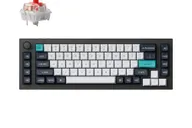 Keychron Keychron Q65 Max $230 “Wireless 65% Q with extra macro keys and a knob” | Keychron Keychron Q1 Max $230 “The 2.4 GHz, Bluetooth and wired 75% Q” |
|---|---|---|
| Price | $230 | $230 |
| Size , different | 65% | 75% |
| Type | Pre-built | Pre-built |
| Connectivity | Wireless + Wired | Wireless + Wired |
| Released | 2023 | 2023 |
| Mounting | Gasket | Gasket |
| Case , different | Aluminum | 6063 Aluminum |
| Colors , different | Carbon Black, Shell White | — |
| Weight , different | 2420 g ± 10g (fully assembled) | 1.72kg (fully assembled) |
| Dimensions , different | 65% | 327.5 x 145mm |
| Typing angle , different | Not listed | 5.2° |
| Front height , different | Not listed | 20.7mm |
| Switches | Mechanical | Mechanical |
| Profile | Standard | Standard |
| Keycaps , different | Double-shot PBT | Double-shot PBT, KSA or OSA profile (fully assembled version) |
| PCB , different | Hot-swap | Hot-swap, South-facing RGB |
| Plates , different | Steel | PC |
| Battery , different | 4000 mAh, up to 180 hours | 4000mAh (up to 180h, backlight off) |
| Compatible switches , different | MX-style | MX-style 3-pin and 5-pin |
| Software | QMK, Keychron Launcher | QMK, Keychron Launcher |
| NKRO | Yes | Yes |
| RGB , different | No | Yes |
| Features , different | 65% layout, Tri-mode, Hot-swap, QMK/VIA, Knob | QMK/VIA, Hot-swap, Double Gasket Mount, Aluminum Case, 2.4GHz + Bluetooth 5.1, South-facing RGB, Screw-in Stabilizers, 1000Hz Polling (2.4GHz & wired) |
| Good for , different | Productivity users who want macro keys in a compact board Serious typists and casual gamers Buyers who want a wireless steel-plate Q | Typists who want a wireless 75% with a quiet, cushioned sound Users who want a low-latency dongle option without leaving the Q line People who like to open the board and adjust foam |
| Skip if , different | Anyone who needs a number pad Travelers People on a tight budget | Buyers who want a low-profile keycap shape or adjustable height Anyone who needs a travel keyboard People who want magnetic switches; the Q1 HE covers that |
| Pros , different | Four dedicated macro keys and a customizable knob in a 65% footprint Extremely sturdy all-metal build (Tom's Guide) 2.4 GHz at 1000 Hz, Bluetooth and wired modes Great for typing and casual gaming (Tom's Guide) QMK-enabled with hot-swap switches and keycaps (XDA Developers) Battery rated up to 180 hours (Keychron) | Three connection modes: 2.4 GHz, Bluetooth 5.1 (three devices) and wired, with 1000 Hz on 2.4 GHz and wired Muffled sound with little case resonance from layered foam and a double-gasket design (AppleInsider) Thick aluminum shell that XDA Developers says will not move on the desk; Keychron lists 1,724 g PC plate, hot-swap sockets for 3-pin and 5-pin switches, QMK/VIA and a knob Gateron Jupiter Red, Brown or Banana switches come pre-installed on the assembled version 4000 mAh battery, rated up to 180 hours by Keychron |
| Cons , different | Very expensive (Tom's Guide) Key placement may take getting used to (XDA Developers) Heavy at about 5.3 lb (Tom's Guide) No number pad (EnosTech) Price is edging toward the enthusiast end (XDA Developers) | No adjustable feet; the angle is fixed at 5.2 degrees (AppleInsider) Wirecutter criticises the tall keycaps and the steep, non-adjustable case slope Keychron's 1000 Hz rating applies to 2.4 GHz and wired; the sibling Q1 HE drops to 90 Hz on Bluetooth (Tom's Guide) Heavy at about 1.7 kg, so not a portable 75% Wirecutter notes it costs more than its own upgrade pick, and AppleInsider's headline calls it costly |
| Research take , different | A well-reviewed wireless 65% with extra keys. Tom's Guide's Editor's Choice backs the build and performance, and the price and weight are the consistent caveats. | The most complete mechanical 75% in the Q line: reviewers praised the build, the sound and the 2.4 GHz option. The tall caps and fixed slope are the recurring complaints, so a wrist rest is worth budgeting for. |