Compare
Pick two boards from the directory and see how they differ.
Shaded rows are where they differ.
| Spec | 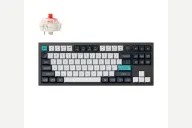 Keychron Keychron Q3 Max $230 “Tri-mode 80% TKL Q praised for sound and build” | 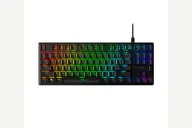 HyperX HyperX Alloy Origins Core $80–$105 “HyperX's aluminum-bodied TKL with red or aqua switches” |
|---|---|---|
| Price , different | $230 | $80–$105 |
| Size | TKL | TKL |
| Type | Pre-built | Pre-built |
| Connectivity , different | Wireless + Wired | Wired |
| Released , different | 2024 | 2020 |
| Mounting , different | Gasket | Integrated Plate |
| Case | Aluminum | Aluminum |
| Colors , different | Carbon Black, Shell White | Black |
| Weight , different | 1770g assembled | About 900 g with cable (1.98 lb, HyperX) |
| Dimensions , different | 365 x 137mm | 360 x 132.5 x 34.5mm |
| Typing angle , different | 5.2° | Three tilt settings |
| Front height , different | 19.7mm without keycaps | 34.5mm |
| Switches | Mechanical | Mechanical |
| Profile | Standard | Standard |
| Keycaps , different | Double-shot PBT, KSA | PBT, HyperX profile |
| PCB , different | Hot-swap, south-facing RGB | Fixed HyperX switches, per-key RGB |
| Plates , different | PC | Aluminum body |
| Battery , different | 4000mAh | — |
| Compatible switches , different | MX-style 3-pin and 5-pin | Fixed HyperX Red or Aqua |
| Software , different | QMK, VIA, Keychron Launcher | HyperX NGENUITY |
| NKRO | Yes | Yes |
| RGB | Yes | Yes |
| Features , different | TKL with knob, Aluminum, Double gasket, QMK/VIA, 2.4GHz + Bluetooth, 4000mAh, Hot-swap | TKL, Aluminum body, HyperX Red or Aqua, Detachable USB-C, Per-key RGB, NGENUITY |
| Good for , different | Buyers who want a tenkeyless metal board with a deep, muted sound Users who split time between typing and casual gaming Anyone who wants three connection modes in a TKL | Gamers who want a compact aluminum TKL Buyers who will replace the keycaps Console and PC players who want a detachable cable |
| Skip if , different | People who dislike a fixed typing angle Travelers Buyers watching price closely | People who want good stock keycaps Hot-swap or wireless shoppers Typists who want a light tactile switch |
| Pros , different | 2.4 GHz, Bluetooth and wired modes; 1000 Hz on 2.4 GHz and wired (Tom's Guide) Tom's Guide called it acoustically damped to the extreme and well built PC Gamer scored it 92 and praised smooth, lubed switches and sturdy build Around three weeks per charge in Tom's Guide's use Screw-in metal stabilizers and double-gasket mount (Tom's Guide spec table) Programmable knob, QMK and Keychron Launcher | Full aluminum body that ZDNet called rock-solid and TweakTown praised Choice of Red linear or Aqua tactile switches with an 80-million-keypress rating (HyperX) Detachable braided USB-C cable (HyperX, ZDNet) Three tilt angles of 3°, 7° and 11° (HyperX) Three onboard profiles and per-key remapping in NGENUITY (HyperX, ZDNet) Compact TKL layout that works with PC and consoles (HyperX) |
| Cons , different | Expensive for a TKL (Tom's Guide, PC Gamer) Heavy: Keychron lists 1,770 g and PC Gamer measured about 2 kg No height adjustment (Tom's Guide) Bluetooth runs at 90 Hz, so use 2.4 GHz or the cable for games Side-printed legends may not appeal to everyone (PC Gamer) | ZDNet called the keycaps among the worst it had reviewed, quick to shine and rattly TweakTown said the Aqua switch needs closer to 60 g to actuate, more than the listed figure NGENUITY lighting settings were found unintuitive (ZDNet) Switches are fixed, with no hot-swap HyperX lists Windows-only OS compatibility for NGENUITY HyperX's page does not state the keycap material |
| Research take , different | One of the best-reviewed boards in the Q line: strong build, sound and connectivity. The weight, price and fixed height are the trade-offs reviewers keep mentioning. | A well-built aluminum TKL held back by its stock keycaps and NGENUITY's lighting menus, according to ZDNet. A good base if you are happy to replace the caps. |