Compare
Pick two boards from the directory and see how they differ.
Shaded rows are where they differ.
| Spec | 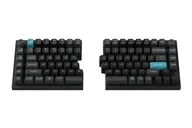 Keychron Keychron Q11 Ultra 8K $240 “A cable-free 75% split in aluminum with 8000 Hz polling and Silk POM switches” | 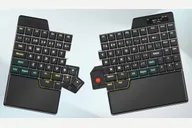 Ultimate Gadget Laboratories Ultimate Hacking Keyboard 80 $429–$462 “A wireless 80% split with a thumb cluster, OLED display, palm rests and hot-swap sockets” |
|---|---|---|
| Price , different | $240 | $429–$462 |
| Size | Split | Split |
| Type | Pre-built | Pre-built |
| Connectivity | Wireless + Wired | Wireless + Wired |
| Released , different | 2026 | 2024 |
| Mounting , different | Gasket | Not listed |
| Case , different | CNC aluminum | Not listed |
| Colors , different | Black, White | Black, Dark Red, Mustard, Navy Blue, White |
| Weight , different | 1724 g +/- 10 g | 1006 g without batteries, 1136 g with batteries |
| Dimensions , different | 133.97 x 345.08 mm | 317 mm wide (left half 130 mm, right half 187 mm) x 220 mm long x 29 mm high with keycaps |
| Typing angle , different | Not listed (reviewers note no tenting) | About 5 degrees of tenting or tilt with the included feet; 10 to 60 degrees with the optional Riser 80 |
| Front height , different | Not listed | 29 mm (with keycaps) |
| Switches | Mechanical | Mechanical |
| Profile | Standard | Standard |
| Keycaps , different | KSA double-shot PBT | Double-shot PBT; legends silk-printed |
| PCB | Hot-swap | Hot-swap |
| Plates , different | PC plate | Not listed |
| Battery , different | 4000 mAh, up to 160 hours (Keychron) | Optional: 3500 mAh (left) and 5000 mAh (right); about a month with LEDs off |
| Compatible switches , different | 3- and 5-pin MX-style | Kailh MX-style (eight types) with Choc v2 on the bottom thumb row |
| Software , different | ZMK, Keychron Launcher | Agent |
| NKRO , different | Yes | No |
| RGB , different | Yes | No |
| Features , different | 75% layout, Wireless split halves, 2.4 GHz and Bluetooth, 8000 Hz polling, Hot-swap, Knob, ZMK | 80% layout, Thumb cluster, Bluetooth and dongle, Hot-swap, OLED display, Wooden palm rest, Modules |
| Good for , different | People who want a split that still looks like a standard 75% board Desk setups that want no cable between the halves Keychron users who want ZMK and wireless | Power users who want deep programmability People who want a wireless split with an OLED Buyers who want modular pointing devices |
| Skip if , different | Buyers who need built-in tenting People who want to use one half alone Anyone sensitive to reported right-half dropouts | Anyone on a tight budget People who want standard keycaps for easy replacement Buyers who want long battery life with the LEDs on |
| Pros , different | Halves sync wirelessly, so no cable between them (Keychron, Tom's Guide) 75% layout with a knob and macro keys (Keychron) Hot-swap Silk POM switches (Keychron) All-aluminum, gasket-mount build (Keychron) 2.4 GHz, Bluetooth and wired, with 8000 Hz polling (Keychron) | Great wireless implementation (GBAtemp) Solid battery life with LEDs off (GBAtemp) OLED display and integrated wooden palm rest (UHK) Hot-swap sockets and eight Kailh switch options (UHK) Replaceable batteries and modular add-ons (UHK) |
| Cons , different | No tenting or height adjustment (allround-pc) No battery indicator (allround-pc) Right half cannot be used on its own (allround-pc) Expensive (allround-pc) Some buyers report the right half losing its connection (Keychron customer reviews) | Poor battery life with LEDs enabled (GBAtemp) Unique keycaps make replacements difficult (GBAtemp) Expensive, with batteries, dongle and Riser 80 extra (UHK) Learning curve for the layout (GBAtemp commenters) |
| Research take , different | A cable-free 75% split with a familiar layout. Reviewers like the build and the freedom to place the halves, and mainly fault the missing tenting and battery indicator and the price. | A powerful, modular wireless split. GBAtemp praised its wireless and configurability and faulted the LED battery life and proprietary keycaps. |