Compare
Pick two boards from the directory and see how they differ.
Shaded rows are where they differ.
| Spec | 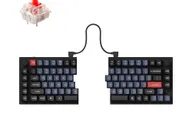 Keychron Keychron Q11 $205 “Split 75% aluminum Q with a knob on each half” | 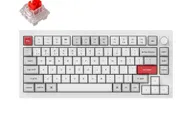 Keychron Keychron Q1 Pro $168 “The Honda Civic of custom keyboards” Best Overall |
|---|---|---|
| Price , different | $205 | $168 |
| Size | 75% | 75% |
| Type , different | Pre-built | Barebones |
| Connectivity , different | Wired | Wireless + Wired |
| Released | 2023 | 2023 |
| Mounting , different | Tray Mount | Gasket |
| Case , different | All-metal | 6063 Aluminum |
| Colors , different | Carbon Black - A, Carbon Black - B, Carbon Black | Carbon Black, Shell White, Silver Grey, Navy Blue |
| Weight , different | 1186 ± 10 g (fully assembled) | 1.74kg (fully assembled) |
| Dimensions , different | 75% | 327.5 x 145 x 35.8mm |
| Typing angle , different | Not listed | 5.2° |
| Front height , different | Not listed | 22.6mm |
| Switches | Mechanical | Mechanical |
| Profile | Standard | Standard |
| Keycaps , different | Double-shot PBT | Double-shot PBT, KSA profile (fully assembled version) |
| PCB , different | Hot-swap | Hot-swap, South-facing RGB |
| Plates , different | Not listed | PC |
| Battery , different | — | 4000mAh (up to 300h, backlight off) |
| Compatible switches , different | MX-style | MX-style 3-pin and 5-pin |
| Software , different | QMK, Keychron Launcher | QMK, VIA, Keychron Launcher |
| NKRO | Yes | Yes |
| RGB , different | No | Yes |
| Features , different | 75% layout, Wired, Hot-swap, QMK/VIA, Knob | QMK/VIA, Hot-swap, Double Gasket Mount, Aluminum Case, Bluetooth 5.1 + USB-C, South-facing LEDs, Screw-in Stabilizers, 1000Hz Polling (wired) |
| Good for , different | People who want a split board for posture comfort Macro-heavy workflows Users who want a premium metal split with VIA | Heavy typists who want a soft, cushioned feel Buyers who want QMK programmability with Bluetooth People who switch between Mac and Windows Anyone who wants to swap switches or tune the build |
| Skip if , different | Anyone who expects tenting out of the box Buyers who want wireless People who need a short learning curve | Competitive gaming over wireless (90Hz polling) Anyone who needs a portable keyboard Buyers who want 2.4GHz wireless on this model People who prefer a low, flat keycap profile |
| Pros , different | Fully split design with adjustable spacing and angle (PCWorld) Premium all-metal construction at about 1.2 kg (Keychron) Dedicated macro keys and a knob on each half (Tom's Guide, PCWorld) Highly customizable with QMK/VIA (Tom's Guide, PCWorld) Hot-swap sockets and a 75% layout with function and arrow keys PCWorld rated its price competitive against cheaper ergonomic boards | Flexible PC plate and gasket mount give a soft, bouncy typing feel (Tom's Guide) Full CNC aluminum case at 1,736 g assembled, so it stays put on the desk Bluetooth 5.1 for up to 3 devices plus USB-C; MakeUseOf found the Bluetooth connection stable QMK firmware with the Keychron Launcher web app for remapping and macros Hot-swap sockets take 3-pin and 5-pin MX-style switches 4000 mAh battery, rated up to 300 hours with the backlight off; Tom's Guide saw two to three weeks per charge Programmable aluminum knob, plus a system toggle and both Mac and Windows keycaps |
| Cons , different | Steep learning curve (Tom's Guide) No tenting kit or wrist rest (Tom's Guide, PCWorld) Short cable between modules (Tom's Guide) Slightly awkward layout around the left spacebar (PCWorld) Wired only Expensive (Tom's Guide) | Wireless is Bluetooth only, at 90Hz polling; 1000Hz needs a USB-C cable No 2.4GHz option on the Pro; Keychron lists the Q1 Max for that Heavy for a 75% and not a board to carry around Tom's Guide heard a slightly hollow stock sound and occasional metallic pings Tall KSA keycaps raised mistype rates in Tom's Guide's typing test An r/Keychron owner report describes spacebar rattle from the stock stabilizers Tom's Guide called the $219 assembled price steep at review time (Nov 2024) |
| Research take , different | A well-regarded premium split keyboard. Reviewers liked the build and customization and mainly faulted the missing tenting kit, short cable and layout quirks. | A comfort-first 75% that suits long typing sessions better than gaming or travel. Reviewers rate the build and typing feel highly and mark it down for weight, price and a stock sound that can ping. If you want 2.4GHz or magnetic switches, compare the Q1 Max and Q1 HE before buying. |