Keychron
Keychron B1 Pro Ultra-Slim
Released 2024
Researched from maker specs and published sources. Last checked Oct 18, 2026.
Ultra-slim 75% scissor-switch board with ZMK and no backlight
A low-profile 75% wireless keyboard with scissor-switch keys, ZMK firmware and no backlight. Tom's Guide and WIRED liked the typing feel; the plastic build and missing backlight are the trade-offs.
Sources
Our take, based on research
A well-reviewed, inexpensive productivity board for people who like low-profile laptop-style keys. If you need backlighting or mechanical switches, look elsewhere; the B3 Pro is the closest sibling with Launcher support.
Overview
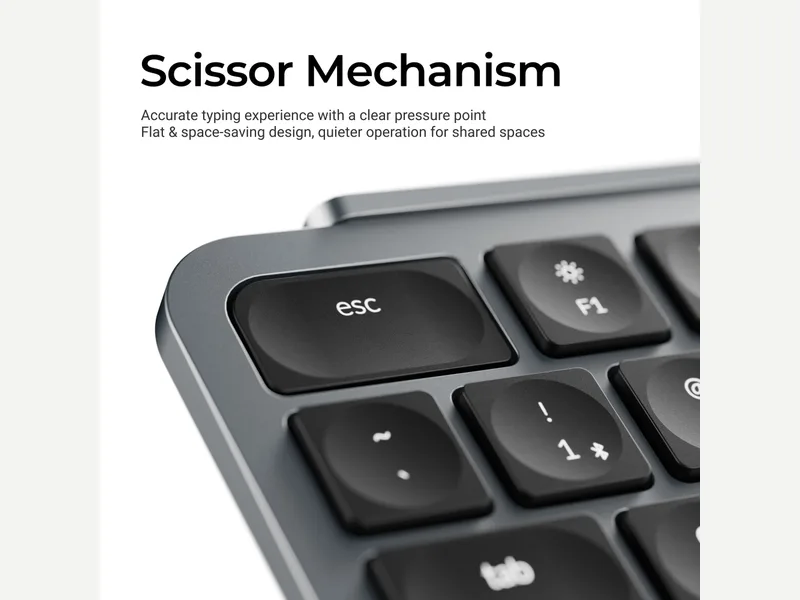
The B1 Pro is Keychron's first ultra-slim scissor-switch board, closer to a laptop keyboard than a mechanical one. Keychron's page lists a 75% layout with 77 keys, ABS keycaps, an 800 mAh battery, 2.4GHz, Bluetooth 5.2 and wired USB-C, and support for ZMK. It weighs 425 g by Keychron's figure and has no backlight. WIRED reviewed it alongside the B6 Pro: it compared the B6 Pro's scissor keys with Logitech's MX Keys S (springy, a touch more resistive) and described the B1 Pro as similar in a more compact form, adding that the three-device switching is more useful on a board small enough to travel. Tom's Guide found it satisfying to type on but disliked the cheap-looking cable and dongle, and noted it does not work with Android. How-To Geek praised the comfortable 3.2 degree angle and rubber feet and said the plastic frame resembles modern Apple laptops. Keychron's page rates the battery at up to 1,200 hours (about 8 months at 5 hours a day) from the 800 mAh cell. Tom's Guide and WIRED both repeated that rating without draining it, so treat it as Keychron's estimate; the lack of a backlight is part of why it is so high. Tom's Guide also says the board did not connect to Android devices, although Keychron's page lists Android as compatible.
Pros & Cons
- Springy, quiet scissor keys (WIRED, Tom's Guide)
- 75% layout in a thin board that fits in a bag
- Tri-mode connection with Mac/Windows layout switch and ZMK firmware support (Tom's Guide, Keychron)
- Rubber feet and a comfortable fixed angle (How-To Geek)
- No backlight (WIRED, Tom's Guide)
- Plastic body; Tom's Guide found it a little heavy for an ultra-slim board
- Cheap-looking cable and dongle, and not compatible with Android (Tom's Guide)
- WIRED noted the physical mode switch is easy to knock when the board is tossed in a bag
- Scissor keys are fixed; no hot-swap and no NKRO listed
Who Is This For?
- Office and travel typists who want a laptop-style feel
- Anyone moving between a few devices
- People who want ZMK remapping on a cheap board
- Gamers who need NKRO or backlighting
- People who want a mechanical sound and feel
- Android users
Where to Buy
Dimensions
296 x 130 mm
Weight
425 g / 0.94 lbs
Case Material
Plastic
Connectivity
Both
Plate Options
Case Colors
Software Support
Similar Keyboards
View all
Looking for something different?
Browse All Keyboards