Compare
Pick two boards from the directory and see how they differ.
Shaded rows are where they differ.
| Spec | 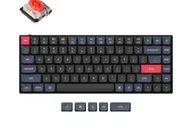 Keychron Keychron S1 $83–$98 “Wired low-profile 75% in CNC aluminum with a steel plate” | Keychron Keychron Q1 Max $230 “The 2.4 GHz, Bluetooth and wired 75% Q” |
|---|---|---|
| Price , different | $83–$98 | $230 |
| Size | 75% | 75% |
| Type , different | Barebones | Pre-built |
| Connectivity , different | Wired | Wireless + Wired |
| Released , different | 2022 | 2023 |
| Mounting , different | Tray Mount | Gasket |
| Case , different | Aluminum | 6063 Aluminum |
| Colors , different | See the store | — |
| Weight , different | 960 g ± 10g | 1.72kg (fully assembled) |
| Dimensions , different | 75% | 327.5 x 145mm |
| Typing angle , different | Not listed | 5.2° |
| Front height , different | Not listed | 20.7mm |
| Switches , different | Low Profile | Mechanical |
| Profile , different | Low Profile | Standard |
| Keycaps , different | Not listed | Double-shot PBT, KSA or OSA profile (fully assembled version) |
| PCB , different | Hot-swap | Hot-swap, South-facing RGB |
| Plates , different | Not listed | PC |
| Battery , different | — | 4000mAh (up to 180h, backlight off) |
| Compatible switches , different | Keychron low-profile | MX-style 3-pin and 5-pin |
| Software , different | QMK | QMK, Keychron Launcher |
| NKRO | Yes | Yes |
| RGB , different | No | Yes |
| Features , different | 75% layout, Wired, Hot-swap, QMK/VIA, Low profile | QMK/VIA, Hot-swap, Double Gasket Mount, Aluminum Case, 2.4GHz + Bluetooth 5.1, South-facing RGB, Screw-in Stabilizers, 1000Hz Polling (2.4GHz & wired) |
| Good for , different | Desk typists who want a flat aluminum 75% People who want a low-profile board with VIA | Typists who want a wireless 75% with a quiet, cushioned sound Users who want a low-latency dongle option without leaving the Q line People who like to open the board and adjust foam |
| Skip if , different | Anyone who wants wireless People who want to use standard MX switches or keycaps | Buyers who want a low-profile keycap shape or adjustable height Anyone who needs a travel keyboard People who want magnetic switches; the Q1 HE covers that |
| Pros , different | CNC aluminum body that feels heavy and solid (How-To Geek) Low-profile Gateron switches and LSA keycaps give a flat, comfortable typing position VIA support for remapping (MakeUseOf, How-To Geek) Hot-swap option for low-profile switches | Three connection modes: 2.4 GHz, Bluetooth 5.1 (three devices) and wired, with 1000 Hz on 2.4 GHz and wired Muffled sound with little case resonance from layered foam and a double-gasket design (AppleInsider) Thick aluminum shell that XDA Developers says will not move on the desk; Keychron lists 1,724 g PC plate, hot-swap sockets for 3-pin and 5-pin switches, QMK/VIA and a knob Gateron Jupiter Red, Brown or Banana switches come pre-installed on the assembled version 4000 mAh battery, rated up to 180 hours by Keychron |
| Cons , different | Wired only Hot-swap works with low-profile switches only (Keychron) Heavy for a low-profile board at 960 g (Keychron) Not every version is hot-swappable | No adjustable feet; the angle is fixed at 5.2 degrees (AppleInsider) Wirecutter criticises the tall keycaps and the steep, non-adjustable case slope Keychron's 1000 Hz rating applies to 2.4 GHz and wired; the sibling Q1 HE drops to 90 Hz on Bluetooth (Tom's Guide) Heavy at about 1.7 kg, so not a portable 75% Wirecutter notes it costs more than its own upgrade pick, and AppleInsider's headline calls it costly |
| Research take , different | A solid low-profile aluminum 75% for wired use. Pick the hot-swap version if you want to change switches. | The most complete mechanical 75% in the Q line: reviewers praised the build, the sound and the 2.4 GHz option. The tall caps and fixed slope are the recurring complaints, so a wrist rest is worth budgeting for. |